A Content Management System (CMS) is a software application that allows users to create, manage, and modify digital content on a website without needing extensive technical knowledge, especially coding (HTML, CSS, etc.).
It essentially acts as a central hub for all your website’s content and provides an easy-to-use interface (often called the backend or admin panel) for tasks like:
-
Content Creation and Editing: Using a visual editor similar to a word processor.
-
Organization: Storing and organizing digital assets (images, videos) and content in a database.
-
Workflow Management: Managing the process of drafting, reviewing, and publishing content.
-
Design and Presentation: Applying templates and themes to control the website’s look and feel.
General Advantages of Using a CMS
1. Ease of Use
-
User-friendly dashboards and drag-and-drop editors.
-
Non-technical users can manage pages, blogs, and images easily.
2. Faster Website Setup
-
Pre-built templates and plugins reduce development time.
-
Launch a website in days, not months.
3. Collaboration-Friendly
-
Multiple users can work simultaneously (e.g., editors, authors, admins).
-
Roles and permissions help control access.
4. SEO & Marketing Integration
-
Many CMSs include SEO tools (meta tags, sitemaps, etc.).
-
Easy to connect analytics, email marketing, and social media.
5. Cost-Effective
-
Many are open-source (free to use) — you only pay for hosting or premium features.
-
Saves money compared to building from scratch.
6. Scalable & Customizable
-
Add new pages, plugins, or modules as your business grows.
-
Supports both small sites and enterprise-level projects.
7. Community & Support
-
Large communities provide tutorials, updates, and plugin libraries.
-
Security patches and improvements released regularly.
General Disadvantages of Using a CMS
1. Maintenance Required
-
You’ll need to update plugins, themes, and core software.
-
Outdated components can cause security risks.
2. Performance Issues
-
Too many plugins or poor hosting can slow your site.
-
Some CMSs need optimization or caching plugins.
3. Security Vulnerabilities
-
Open-source CMSs are common targets for hackers.
-
Requires strong passwords, backups, and firewalls.
4. Design Limitations
-
You’re often bound by available themes or templates.
-
Heavy customization may need developer help.
5. Learning Curve
-
Although simpler than coding, some CMS dashboards can be complex.
-
Managing SEO, plugins, and backups may take time to master.
6. Hidden Costs
-
Premium themes, plugins, or hosting may add up.
-
eCommerce CMS platforms subscription fee + transaction fees.
What CMS Does ?
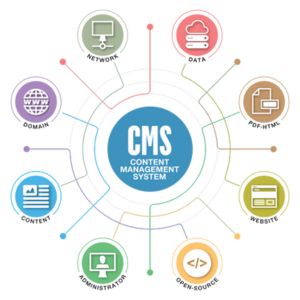
A CMS typically includes:
-
Content editor (WYSIWYG) – like a word processor for webpages.
-
Template management – controls your website’s design and layout.
-
User roles & permissions – allows teams to collaborate safely.
-
SEO, plugin, and media tools – for optimization and media uploads.
-
Database & backend management – stores your pages, posts, and files.
Main Types of CMS
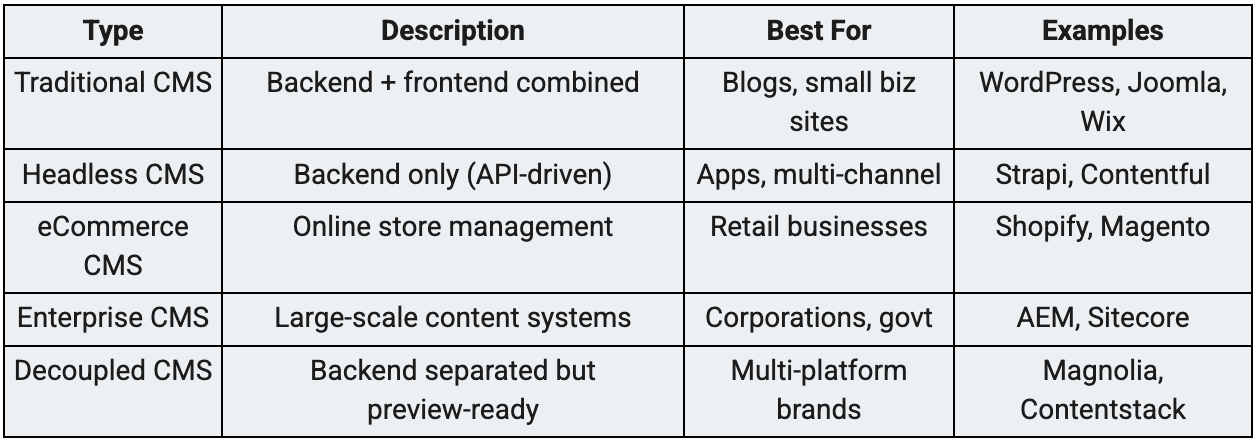
There are five major types of Content Management Systems, each with different strengths depending on what you need:
1. Traditional CMS (Coupled CMS)
A traditional (or coupled) CMS manages both the content and the presentation layer — meaning the backend (where you edit) and the frontend (what visitors see) are tied together in one system.
Examples:
-
WordPress
-
Joomla
-
Drupal
2. Headless CMS
A headless CMS separates the content storage (backend) from the presentation layer (frontend).
You manage content in one place, then deliver it to multiple platforms (website, app, smartwatch, etc.) via API.
3. eCommerce CMS
A CMS focused specifically on managing online stores — including product catalogs, checkout systems, and payments.
4. Enterprise CMS
Enterprise-level systems built for large organizations managing multiple sites, languages, or teams.
They focus on workflow automation, security, and scalability.
5. Decoupled CMS (Hybrid CMS)
Similar to a headless CMS, but includes a frontend delivery system.
You can manage content separately while still previewing it within the same platform — a mix between traditional and headless.
Summary Table
Most Popular CMS Platforms (2025)
Here’s a quick rundown of the major ones, categorized by type:
- General Website & Blog CMS
- WordPress – #1 worldwide
- ✅ Best for: blogs, business sites, and eCommerce with WooCommerce.
- 💪 Strength: massive plugin ecosystem and flexibility.
2. Joomla!
-
✅ Best for: multilingual or community-based sites.
-
💪 Strength: strong user management and content organization.

3. Drupal
-
✅ Best for: government, enterprise, or highly customized projects.
-
💪 Strength: security and scalability.
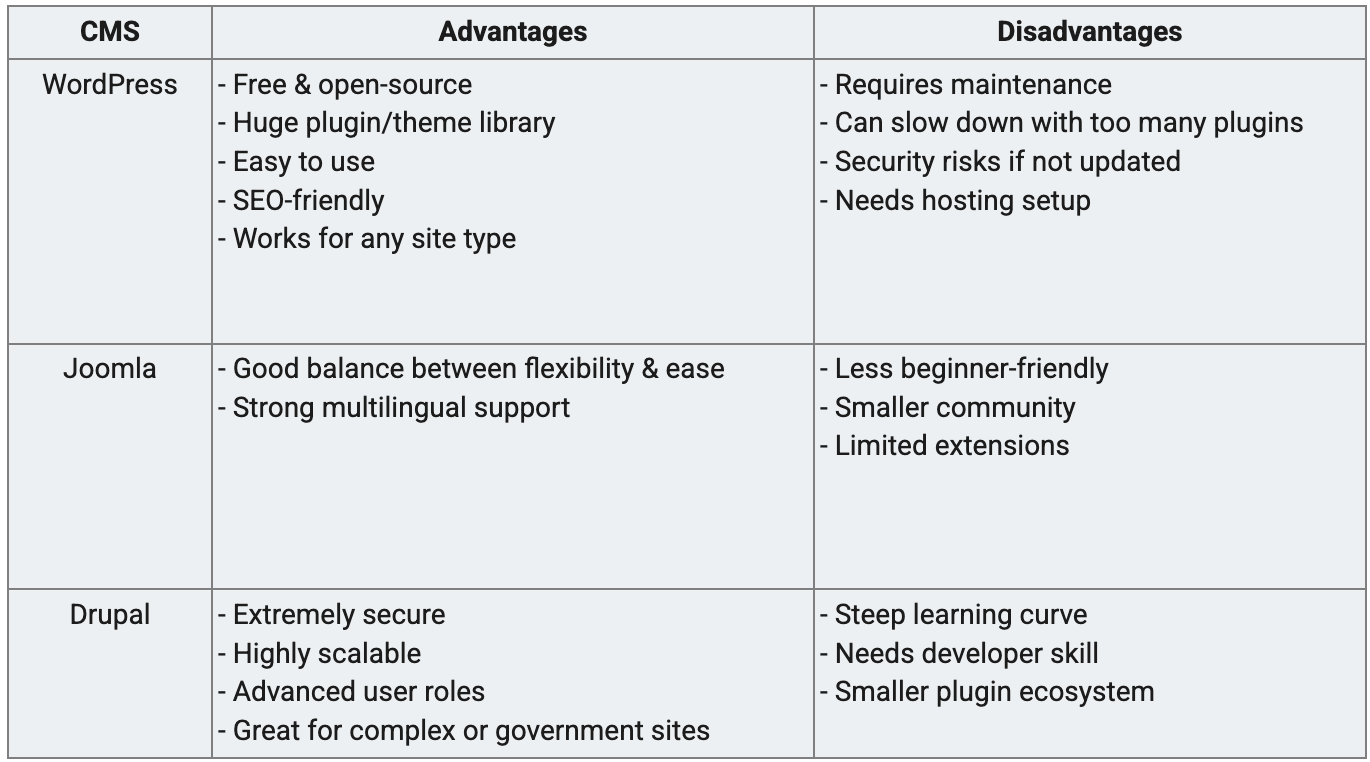
CMS Platform Comparison: Pros & Cons
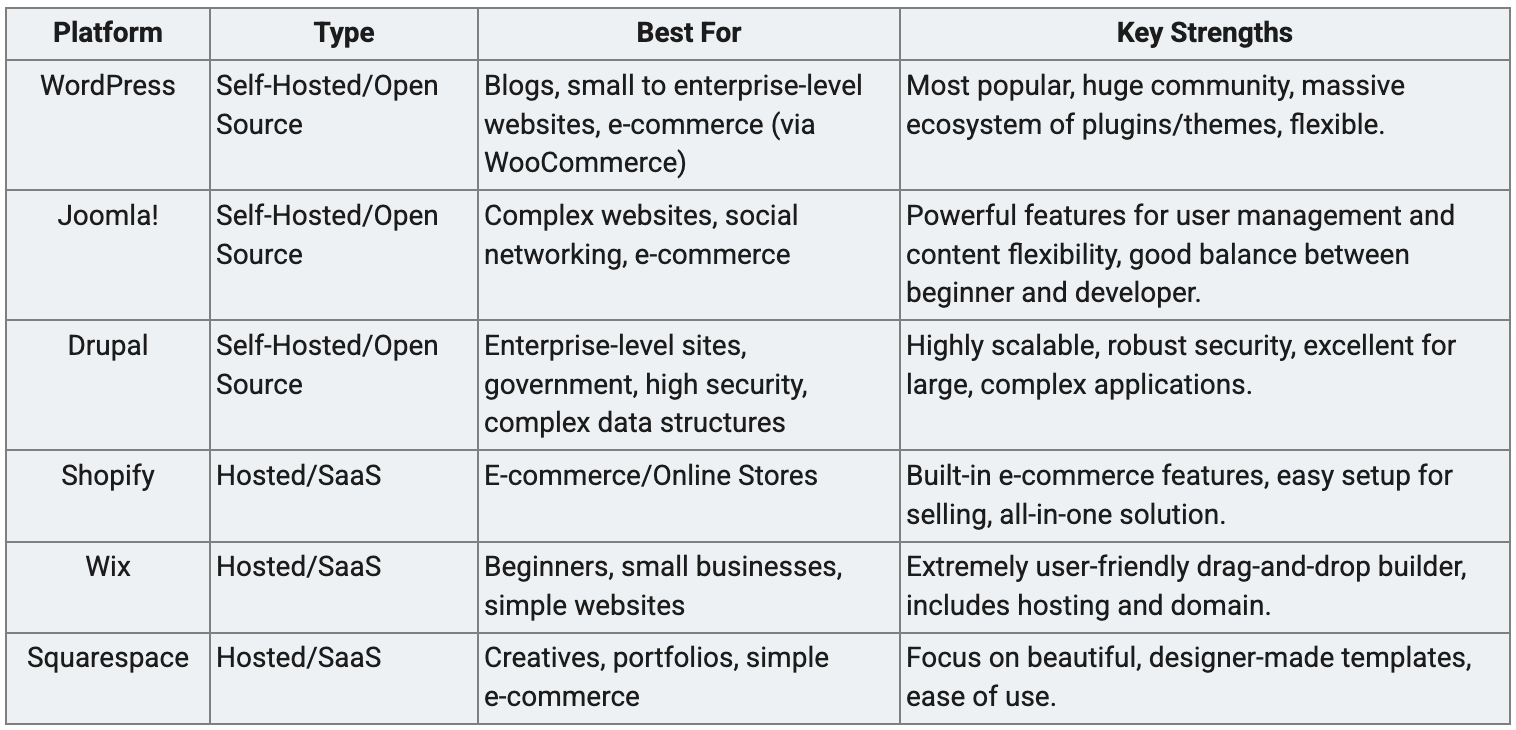
Most Popular CMS Platforms List
The CMS market is diverse, but the most popular options generally fall into two categories:
– Self-Hosted (you install it on your own web host)
– Hosted/SaaS (Software as a Service, where the vendor hosts and manages the platform for you).
How to Choose the Right CMS?
Choosing the right CMS is a critical decision that impacts your website’s longevity, security, and ease of maintenance. Here are the key factors to consider:
- Determine Your Website’s Goal and Scale:
-
Personal Blog/Portfolio: Simpler, hosted solutions like Wix, Squarespace, or a basic WordPress install might suffice.
-
E-commerce Store: Platforms with built-in features like Shopify or WooCommerce (a WordPress plugin) are best.
-
Large Corporation/Government: High-security, scalable, and complex systems like Drupal or enterprise-grade options (e.g., Adobe Experience Manager) are usually needed.
2. Evaluate Your Technical Skill Level:
-
Beginner (No coding): Choose a fully-hosted, drag-and-drop builder like Wix or Squarespace, which handle all the technical details.
-
Intermediate (Comfortable with settings/plugins): WordPress is the best fit, offering a mix of ease-of-use and flexibility.
-
Expert (Developers, custom needs): Drupal or a Headless CMS is ideal for custom code and complex data requirements.
3. Consider Budget and Long-Term Costs:
-
Open-Source (e.g., WordPress.org, Drupal): The software is free, but you pay for hosting, domain, premium themes, and plugins. Overall costs can be lower but require more management.
-
Hosted/SaaS (e.g., Shopify, Wix): You pay a mandatory monthly subscription fee, which includes the software, hosting, and support, making the management simpler but potentially more expensive long-term for high traffic or advanced features.
4. Check for Required Features and Integrations:
-
Does it support a good SEO workflow?
-
Can it integrate with your existing tools (e.g., CRM, marketing automation, analytics)? Look for good APIs or readily available plugins.
-
Do you need features like multi-language support, advanced user roles/permissions, or specific content types (e.g., video galleries, membership gates)?
5. Assess Support and Community:
-
Proprietary/Hosted CMS: Offers dedicated customer support from the vendor.
-
Open-Source CMS: Relies on a vast, active community (forums, tutorials, developers) for troubleshooting and finding plugins. A large community ensures the platform is regularly updated and bugs are quickly addressed.
Your CMS Journey Starts Here — Zoewebs Is Ready to Help
When choosing a CMS, consider your business goals, technical skills, budget, and website type.
-
If you want a quick setup and easy management, go for WordPress.
-
If your site needs multilingual or community features, try Joomla.
-
For complex, large-scale projects, Drupal is the best fit.
At Zoewebs, we help businesses choose and build the right CMS solution — from setup and design to optimization and maintenance. Whether you need a simple company site or a scalable enterprise platform, our team ensures your website runs smoothly, securely, and effectively.